Loading...
educationAug 20, 202621:32pending
Course 40 - Web Scraping with Python | Episode 40: Introduction to Advanced Web Scraping: Tools and Tactics
About this episode
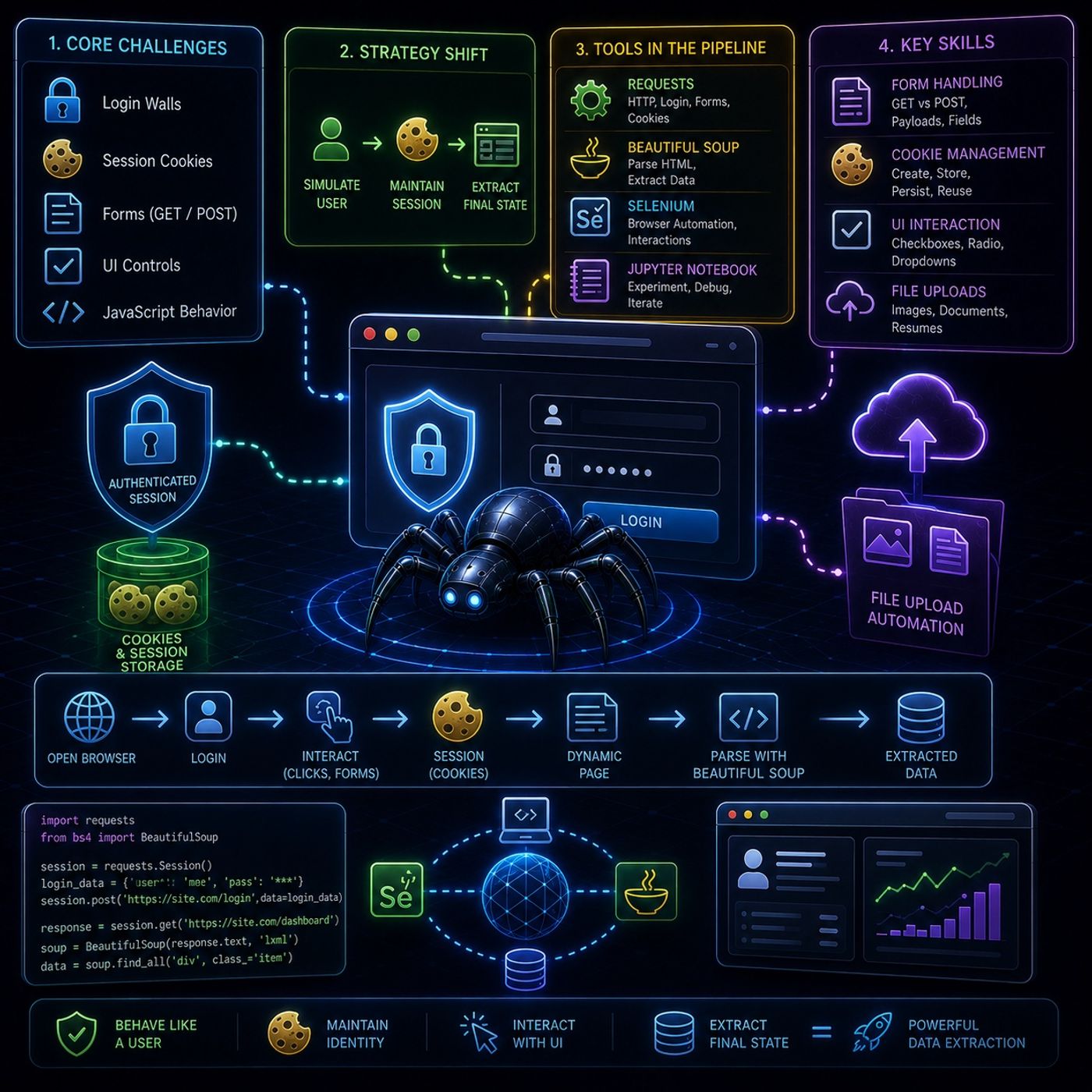
This episode is essentially about moving from “simple scraping” → “interactive web automation + session-aware extraction”, where websites behave more like applications than static pages.🧠 Core Idea of the CourseStandard scraping fails when websites:
but “web application interaction engineering”🔥 Final TakeawayThe major shift in this episode is:From passive scraping:
You can listen and download our episodes for free on more than 10 different platforms:
https://linktr.ee/cybercode_academy
- require login
- depend on session state (cookies)
- use forms instead of URLs
- rely on user interaction (buttons, uploads, checkboxes)
- 🔑 Login walls
- 🍪 Session cookies
- 🧾 Form submissions (GET / POST)
- ☑️ UI controls (checkboxes, radio buttons)
- 🧠 JavaScript-driven behavior
- Network layer (Requests)
- Session layer (cookies, authentication)
- Browser layer (Selenium automation)
- login requests (when simple)
- form submissions (POST/GET)
- session handling with cookies
- parsing returned HTML
- extracting structured data after interaction
- full browser automation
- JavaScript-heavy pages
- clicking, scrolling, uploading files
- step-by-step experimentation
- debugging scraping logic interactively
- login forms
- search forms
- multi-field submissions
- GET vs POST behavior
- payload construction
- form field mapping
- staying logged in
- maintaining sessions
- accessing personalized content
- how cookies are created
- how to persist them across requests
- how servers use them to identify users
- checkboxes
- radio buttons
- dropdown menus
- image uploads
- resume submissions
- document uploads
- locate file input fields
- send file paths directly to browser elements
- requests
- beautifulsoup4
- selenium
- matches Chrome version
- allows Selenium to control browser
- acts as bridge between script and browser engine
- Selenium opens browser
- User-like actions (login, clicks, forms)
- Cookies/session stored
- Page becomes personalized
- Beautiful Soup extracts final structured data
but “web application interaction engineering”🔥 Final TakeawayThe major shift in this episode is:From passive scraping:
- download HTML
- parse content
- behave like a user
- maintain identity (cookies)
- interact with UI
- extract final state
You can listen and download our episodes for free on more than 10 different platforms:
https://linktr.ee/cybercode_academy
Hosts & guests
No transcript yet
This episode has not been transcribed. Request it and it moves to the front of the queue.
More episodes


