Loading...
educationAug 15, 202620:22pending
Course 40 - Web Scraping with Python | Episode 35: Locating Dynamic Elements with Selenium and Python
About this episode
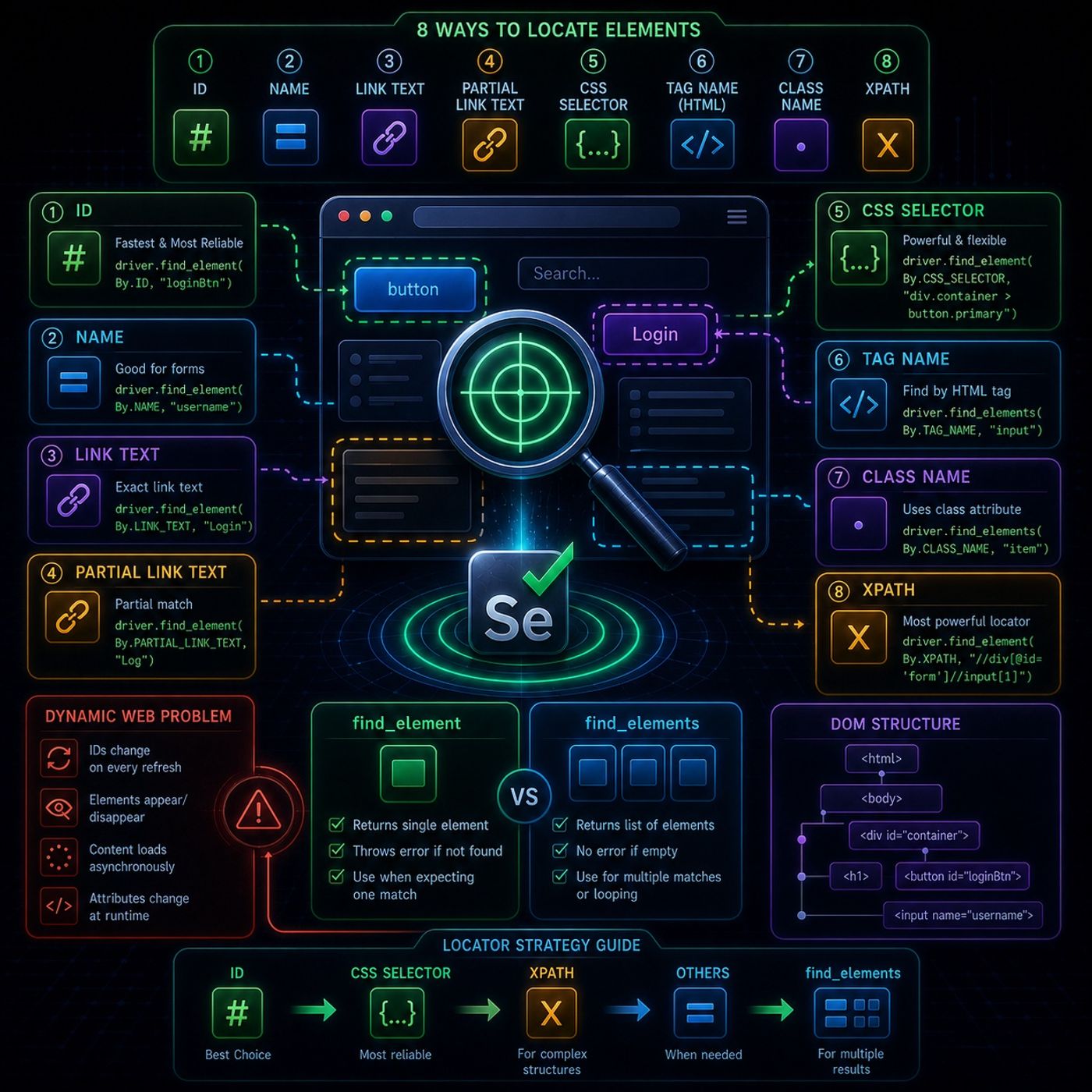
This module is basically about the core skill in Selenium automation: reliably finding the right element on a page that keeps changing.🧩 What “locating elements” really meansIn Selenium, everything you interact with is a web element, such as:
You can listen and download our episodes for free on more than 10 different platforms:
https://linktr.ee/cybercode_academy
- buttons
- input fields
- links
- images
- hidden UI components used by JavaScript
- IDs change on every refresh
- classes are generated randomly
- elements appear/disappear after AJAX calls
- regenerate DOM elements constantly
- load content asynchronously
- modify attributes at runtime
- Fastest and most reliable
- Must be unique
- Breaks only if developers change structure
- Works when ID is missing
- Common in forms
- Matches full hyperlink text
- Example: “Login”
- Matches part of a link
- More flexible but less precise
- Very powerful and widely used
- Uses patterns like:
- classes
- hierarchy
- attributes
- Finds elements like , ,
- Usually returns many results
You can listen and download our episodes for free on more than 10 different platforms:
https://linktr.ee/cybercode_academy
Hosts & guests
No transcript yet
This episode has not been transcribed. Request it and it moves to the front of the queue.
More episodes


