Loading...
educationAug 9, 202619:25pending
Course 40 - Web Scraping with Python | Episode 29: From Feed and Sitemap Spiders to CrawlSpider Demos
About this episode
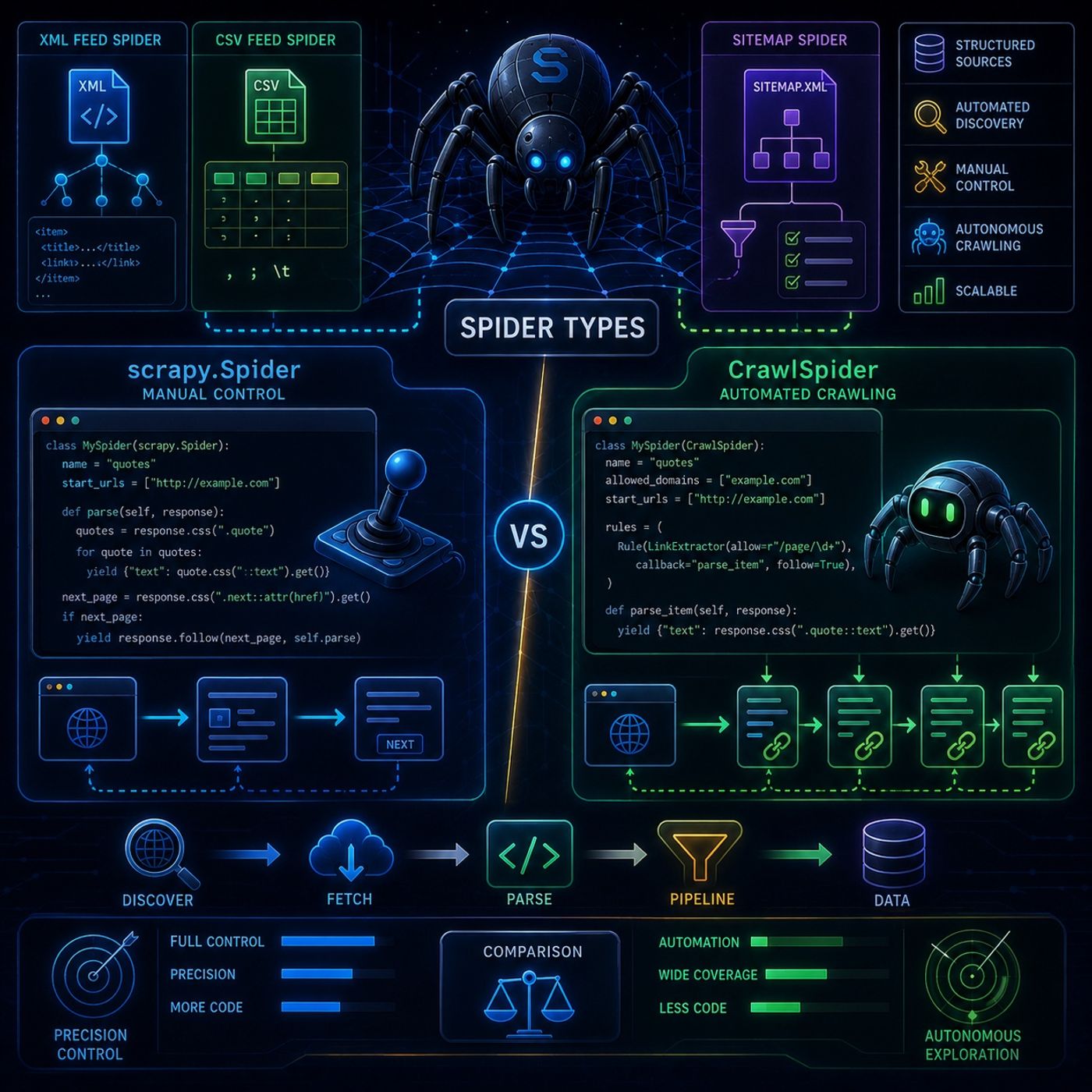
This episode is really about choosing between manual control and automated crawling logic inside Scrapy, and understanding how specialized spider classes change your level of control.Here’s the structured breakdown:🕷️ Scrapy Spider Types — Practical Comparison & Feed Spiders1. Feed-Based Spiders (Structured Data Sources)These spiders are not designed for HTML pages — they target pre-structured data formats.📄 XMLFeedSpider ScrapyPurpose:Extract structured data from XML feeds.Key concept:
CrawlSpider = autonomous exploration📌 Mental ModelTypeStrengthWeaknessscrapy.SpiderFull controlMore codeCrawlSpiderAutomationLess fine-grained controlSitemapSpiderFast discoveryDepends on sitemapXML/CSV SpidersStructured feedsLimited flexibility
You can listen and download our episodes for free on more than 10 different platforms:
https://linktr.ee/cybercode_academy
- Works by iterating through XML nodes
- Uses itertag to define which tag to extract
- Uses iterator mode (itnodes) for performance
- Custom delimiters (, ; \t)
- Configurable quote characters
- Header mapping → fields become item keys
- Reads sitemap.xml
- Extracts all URLs listed
- Filters URLs using:
- regex rules
- callback mapping rules
- You define:
- start_urls
- parse() logic
- pagination logic manually
- Every request
- Every page transition
- Every extraction step
- CSS selectors used explicitly
- Must manually follow “next page” links
- Full control over flow
- Uses Rules + LinkExtractors
- Automatically follows links
- Finds links automatically
- Filters them using regex or CSS rules
- Calls callbacks automatically
- Much broader by default
- Can crawl entire domains unless restricted
- Manually extract data
- Manually handle pagination
- Pages may finish in non-sequential order (async execution)
- Automatically follows links
- Less manual parsing logic
- More scalable for large websites
CrawlSpider = autonomous exploration📌 Mental ModelTypeStrengthWeaknessscrapy.SpiderFull controlMore codeCrawlSpiderAutomationLess fine-grained controlSitemapSpiderFast discoveryDepends on sitemapXML/CSV SpidersStructured feedsLimited flexibility
You can listen and download our episodes for free on more than 10 different platforms:
https://linktr.ee/cybercode_academy
Hosts & guests
No transcript yet
This episode has not been transcribed. Request it and it moves to the front of the queue.
More episodes


